Charlottesville Town Hall Sound

Town hall sound system rental in Charlottesville—planned so every speaker can be understood.

Coordinate presenter microphones, moderated audience questions, room coverage, playback, accessibility handoffs, testing, and live operation from one practical audio plan.

1-business-day responseClear next steps, without pressureVenue-specific planningCoverage, power, access, and timingCentral Virginia serviceCharlottesville and surrounding communities
Service planning

Choose the complete event solution—not one disconnected item.

A town hall is not just a speech with a louder speaker. It may move between a host, executive remarks, panels, recorded media, recognition, and unscripted audience questions. Each transition changes which microphone is live, who controls it, and where listeners need clear speech. Blue Ridge Sound scopes the PA, inputs, microphone workflow, speaker placement, testing, staffing, and backup decisions around the actual agenda and occupied space. Video, projection, streaming, recording, interpretation, captioning, and assistive-listening systems are included only when specifically confirmed with the responsible providers in the written scope.

Common uses

  • Employee town halls and all-hands meetings
  • Public forums and moderated community meetings
  • Leadership updates with multiple presenters
  • Panels followed by audience questions
  • Indoor rooms, covered spaces, and outdoor company gatherings
  • Programs needing delivery, setup, rehearsal, or an audio technician
Scope options

What can be included.

The final proposal confirms exact equipment, quantities, labor, delivery, operation, and teardown. Nothing is assumed from a generic package name.

  • PA loudspeakers placed for the confirmed audience area
  • Handheld, wearable, lectern, or panel microphone options as appropriate
  • Mixer channels, media playback, and program cue coordination
  • A defined microphone handoff plan for audience questions
  • Room walkthrough, line checks, and representative speech testing
  • Cable, power, access, and equipment-footprint planning
  • Staffed live mixing or self-serve rental options when appropriate
  • A written proposal defining equipment, labor, responsibilities, timing, and price

Start with the agenda, not an equipment count

Build the audio plan from the sequence of the meeting. Identify the host, scheduled presenters, panelists, remote or recorded segments, recognition moments, audience-question period, breaks, walk-on music, and closing remarks. Record who introduces each segment, who authorizes schedule changes, and whether any speaker will move away from a fixed position. A clear run of show exposes overlapping microphone and playback needs before load-in.

Share the latest agenda with the audio contact and mark every point at which a voice, device, or source enters the system. The corporate event AV checklist can help organizers gather presenter, playback, access, and rehearsal details without assuming that a generic package covers them.

Match microphones to speakers and handoffs

A lectern presenter, a walking moderator, a seated panel, and an audience participant do not use microphones the same way. Clothing, mobility, speaking style, stage position, channel count, handoff time, and the need to keep both hands free influence whether a handheld, wearable, wired, or fixed microphone is practical. Final microphone models and quantities depend on the confirmed event and available inventory.

Audience questions need an operating method. Decide whether a staff member carries a handheld microphone, questions are collected in advance, or a fixed question position is used. Assign a moderator who will recognize speakers and an audio operator who will open and close channels. That plan protects intelligibility and keeps an unattended microphone from adding room noise or feedback.

Design coverage for the occupied room

Seat count is only a starting point. Room depth, width, ceiling height, reflective surfaces, partitions, stage position, background noise, seating orientation, and any overflow area affect how speech travels. Loudspeakers should cover listeners as evenly as practical while preserving sightlines, exits, aisles, camera positions, and reasonable distance from open microphones.

A deep or irregular space may need more than one coverage zone rather than extra level from the front. Testing should include representative speech from each microphone and listening checks at the front, middle, sides, rear, and any overflow position. The goal is understandable language across the useful audience area, not a single loud measurement near the mixer. See the coverage and intelligibility resource for the underlying planning principles.

Protect gain before feedback

Feedback risk rises when an open microphone hears too much of the loudspeaker system. Speaker position, microphone direction, presenter movement, monitor use, room reflections, channel count, and gain structure all matter. Moving a loudspeaker, coaching microphone distance, or muting unused channels can be more effective than trying to solve every problem with equalization.

Sound checks should use normal speaking voices and the real presenter positions. A quick tap on a microphone does not test intelligibility, headroom, handling noise, or movement. Panels and audience Q&A benefit from an operator who watches unused channels, follows the moderator, and responds when a participant holds a microphone too far away. Blue Ridge Sound confirms any staffed mixing role in the proposal.

Coordinate wireless microphones responsibly

Wireless microphone channels require compatible equipment, legal operating ranges, frequency coordination, receiver and antenna placement, fresh batteries, and a backup plan. The Federal Communications Commission explains that wireless-microphone users share spectrum with other services and must follow applicable operating rules. The event location and the number of simultaneous channels matter more than a familiar frequency label.

Tell the audio team about venue wireless systems, outside production providers, broadcast crews, security communications, and performers bringing their own wireless equipment. Coordination should happen before doors open and be checked again on site. No wireless system can promise an interference-free environment, so the written plan should identify practical alternatives for the most important speaking positions.

Plan accessible communication with the organizer

Clear room audio can support participation, but it does not by itself satisfy every communication need. The organizer should identify requests for assistive listening, interpretation, captioning, transcripts, accessible digital materials, or other aids and assign the qualified provider responsible for each. Blue Ridge Sound can coordinate compatible audio connections only when those interfaces and responsibilities are confirmed in advance.

The U.S. Department of Justice notes that effective communication depends on the nature, length, complexity, and context of the information and the person's usual communication method. The U.S. Access Board also publishes technical guidance for communication elements and assistive-listening systems. These sources are useful planning context, not legal advice or a promise that a particular event configuration meets every requirement.

Confirm power, access, cabling, and room timing

Document load-in access, parking, stairs or elevators, room turnover, setup window, rehearsal time, doors-open time, teardown deadline, equipment storage, cable routes, available power, shared electrical loads, venue rules, and the person who can approve changes. A town hall often shares space with catering, seating, staging, displays, or normal workplace activity, so the audio footprint must be coordinated rather than assumed.

Protect cable paths and keep exits, accessible routes, and staff movement clear. If the meeting is outdoors or under a temporary structure, add weather monitoring, protected equipment positions, an alternate plan, and a named decision maker. The organizer and venue retain responsibility for safety decisions, permissions, and legal requirements.

Send a complete brief for a useful proposal

Include the date, venue and room, indoor or outdoor setting, audience layout, estimated attendance, agenda, presenter and panel count, microphone preferences, audience-question method, playback sources, existing equipment, accessibility interfaces, power information, access window, rehearsal, public start and end times, staffing preference, and teardown deadline. Photos and a floor plan make speaker positions, cable routes, and coverage limits easier to discuss.

Blue Ridge Sound can consider a delivered rental, setup and testing, or technician-operated audio production depending on the event and confirmed availability. The proposal defines what is included and who owns each task. Projection, displays, livestreaming, recording, internet, staging, interpretation, captioning, and other services are not assumed unless they are explicitly listed.

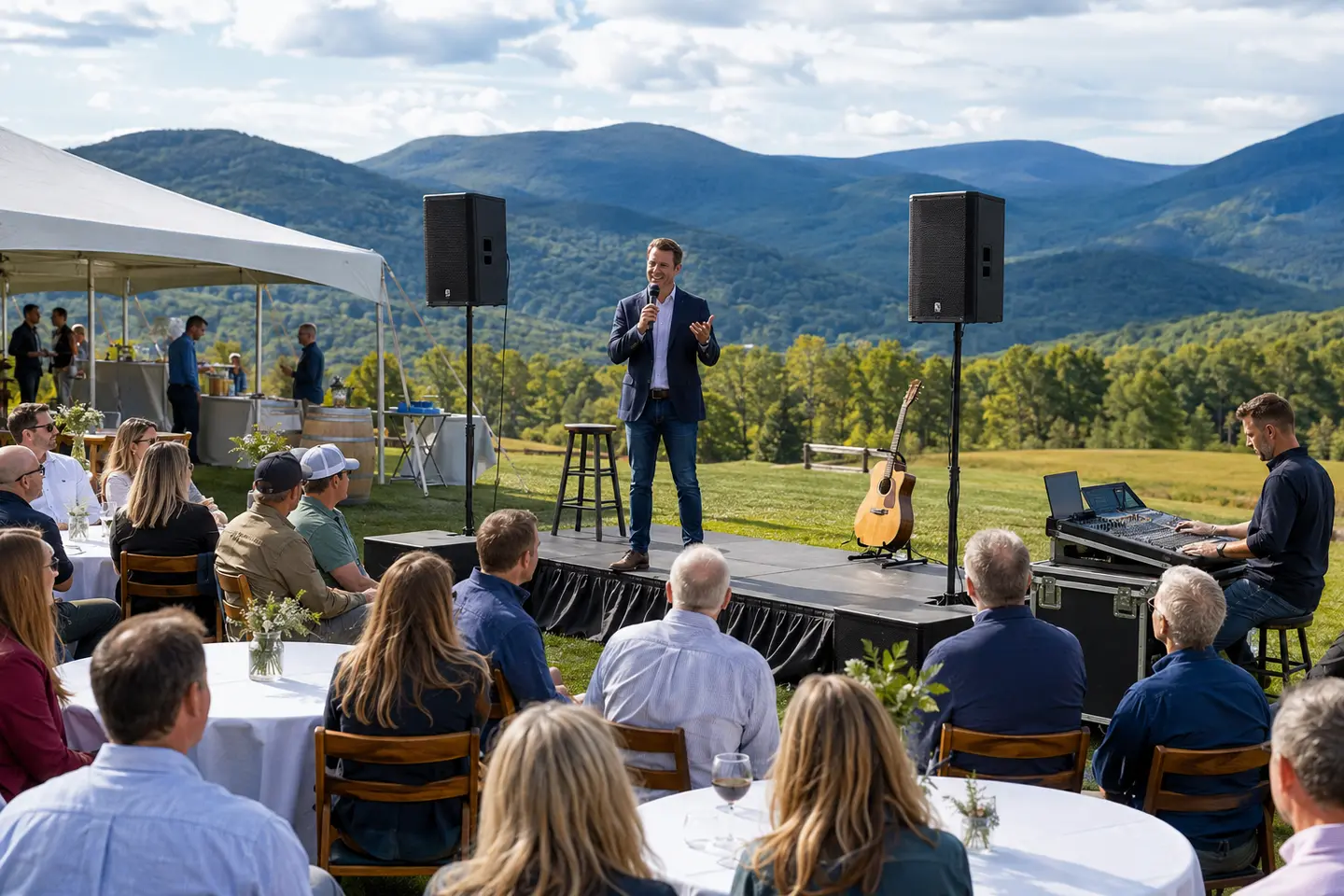
Professional PA speakers and a wireless microphone arranged for an outdoor company event in Central Virginia
Town hall speech coverage

Every presenter, handoff, and audience question belongs in the plan.

Microphone workflow, room coverage, playback, accessibility interfaces, testing, and live operation work best as one coordinated system.

Plan your event →
Planning FAQ

Answers before event day.

What sound system is needed for a town hall meeting?

The useful system depends on the room or outdoor area, audience layout, presenter and panel format, number of simultaneous microphones, audience questions, playback, background noise, power, and who will operate it. Blue Ridge Sound reviews those details before recommending equipment.

How many microphones do we need for an employee town hall?

Count every speaking position and transition: host, executives, panelists, audience questions, and any backup position. A shared microphone can reduce channel count but adds handoff time. The final plan balances natural conversation, reliability, room layout, and confirmed inventory.

Can the sound system support audience Q&A?

Yes, when the Q&A workflow is included in the scope. Common plans use a staff-carried wireless handheld or a fixed question position, plus a moderator and an operator who manages open channels.

Can Blue Ridge Sound play audio from presentation videos?

Compatible media-audio playback can be scoped and tested from the confirmed device. Projection, displays, streaming, recording, internet, and video switching are separate requirements unless the written proposal specifically includes them.

Do town hall meetings need an on-site audio technician?

A simple meeting may be suitable for a delivered rental when a qualified person will operate it. Multiple presenters, panels, audience questions, media cues, room changes, or tight transitions often benefit from staffed operation. The proposal confirms the selected service mode.

How should accessibility be planned for a town hall?

Ask attendees what communication support they need, document the organizer's plan for assistive listening, interpretation, captioning, transcripts, and accessible materials, and confirm any audio interfaces early. Clear PA coverage alone does not address every communication requirement.

How much does town hall sound system rental cost in Charlottesville?

Pricing depends on the venue, audience area, microphones, playback, delivery, access, setup, rehearsal, staffed operation, event duration, and teardown. Blue Ridge Sound provides the price and included responsibilities in a written proposal after reviewing the event details.

Get the right system on the first trip.

Send the venue and event details. Blue Ridge Sound will recommend a practical rental or staffed production scope.

Start your quote →