Charlottesville Podium & Lectern Microphone Rental

Podium microphone rental in Charlottesville—planned around the speaker, lectern, room, and complete sound system.

Give presenters a stable speaking position and the audience a clear signal by planning microphone placement, lectern fit, gain, loudspeaker coverage, handoffs, accessibility, and operator responsibility together.

Check availability & get a quote →Compare packages
1-business-day responseClear next steps, without pressureVenue-specific planningCoverage, power, access, and timingCentral Virginia serviceCharlottesville and surrounding communities
Service planning

Choose the complete event solution—not one disconnected item.

A podium microphone is not a stand-alone cure for difficult speech audio. The useful result depends on the lectern, presenter height and movement, microphone type and working distance, room reflections, loudspeaker position, mixer input, phantom-power needs, cable routing, sound check, and the person managing levels. Blue Ridge Sound can scope temporary podium or lectern microphone support as part of a confirmed Charlottesville-area event-audio plan. Specific microphone models, quantities, wireless channels, installed-system connections, availability, and staffed operation are included only when stated in the written proposal.

Common uses

  • Keynotes, lectures, graduations, awards, recognitions, and formal remarks
  • Government, nonprofit, university, association, and company meetings
  • Fundraisers, galas, memorial programs, worship events, and community forums
  • Programs with several presenters sharing one fixed speaking position
  • Indoor or protected outdoor events requiring speech reinforcement and audience coverage
  • Equipment-only, setup-supported, or staffed sound when the proposal confirms the service level
Scope options

What can be included.

The final proposal confirms exact equipment, quantities, labor, delivery, operation, and teardown. Nothing is assumed from a generic package name.

  • Program, presenter, room, lectern, audience, access, power, and schedule review
  • Podium, lectern, stand-mounted, handheld, lavalier, or headset alternatives by use case
  • Mixer, phantom power, cable, stand, windscreen, shock isolation, and PA compatibility planning
  • Loudspeaker placement, coverage, gain-before-feedback, equalization, and level checks
  • Presenter handoffs, height changes, notes, laptops, water, lighting, and sightline coordination
  • Load-in, setup, line check, rehearsal, operation, backups, and strike when included

Define every presenter and every transition

List the speakers in program order and note whether each person reads from prepared remarks, uses a laptop or printed notes, changes slides, turns toward a screen, steps away from the lectern, answers questions, or hands the position to another presenter. Record height differences, mobility considerations, quiet or projected voices, shared interpreters, panel transitions, walk-up music, video playback, and moments when the microphone must be muted or moved. A single keynote and an awards program with twenty rapid handoffs place very different demands on the same speaking position.

Name the stage manager, event lead, venue contact, playback operator, and audio decision-maker. Decide who adjusts the microphone between speakers, who advances cues, who confirms names and titles, and what happens if a presenter rejects the lectern or moves beyond the pickup area. Blue Ridge Sound uses this information to scope a temporary event-audio plan; it does not imply that a particular microphone, lectern, podium, remote control, or presentation service is available until the proposal confirms it.

Inspect the lectern, stage, room, and audience geometry

Provide photos and dimensions of the lectern top, front, base, cable openings, mounting points, reading light, laptop shelf, branding panel, and available surface area. Identify whether the lectern belongs to the venue, moves during the program, has an installed microphone, or can accept a temporary base or stand without damage. Map the stage height, stairs or ramp, presenter path, screen, cameras, lighting, loudspeakers, monitors, seating, aisles, accessible routes, control position, doors, reflective walls, ceiling, balcony, and approved cable routes.

A flexible gooseneck can place a capsule near a fixed speaker, while a separate floor or table stand may be safer when the venue does not permit attachment. Outdoor locations add wind, weather protection, ground stability, power, sound limits, and an alternate plan. The venue should approve equipment positions, attachment methods, floor protection, power connections, load-in times, egress, and any use of an installed system before the event plan is treated as final.

Choose the microphone path for the way people will speak

A podium or lectern microphone works best when presenters remain within a consistent working area. Capsule pattern, sensitivity, gooseneck length, mounting, shock isolation, wind protection, and presenter technique influence clarity and feedback margin. A handheld microphone can accommodate audience questions or speakers who step away; a lavalier or headset can support movement but introduces wardrobe, fit, battery, frequency, and handoff considerations. The correct path comes from the program rather than the visual preference alone.

Confirm whether the microphone is wired or wireless, dynamic or condenser, self-contained or part of another system, and whether it requires phantom power, a preamplifier, a transmitter, a receiver, a specific connector, or an installed input. Do not assume a venue wall plate or cable is compatible because it physically fits. Model information, wiring, signal level, grounding, routing, power, authorization, and ownership responsibilities must be confirmed before temporary equipment connects to a house system.

Build gain-before-feedback into the layout

Speech intelligibility begins with useful direct sound at the microphone. Position the capsule close enough for the selected microphone and presenter while keeping it outside the direct breath stream and clear of notes, laptop screens, jewelry, clothing, page turns, and tapping hands. Keep loudspeaker and monitor energy away from the microphone’s sensitive direction where practical. Unused microphones should not remain open simply because they are on stage, and multiple lectern microphones should not be treated as automatically better.

Set gain while the actual presenter speaks at realistic levels and positions. Then listen from the front, center, sides, rear, under balconies, near doors, and in overflow areas. High-pass filtering, equalization, dynamics, delays, automixing, and feedback suppression can support a sound design, but they cannot repair a distant speaker, poor loudspeaker geometry, excessive open microphones, incompatible connections, or a presenter who turns away from the pickup area. The goal is even, intelligible coverage—not maximum volume.

Plan the speaking position as a complete workstation

A lectern can accumulate printed programs, folders, laptops, tablets, water, trophies, lights, timers, confidence monitors, remote controls, name cards, cables, and decorative elements. Confirm what must fit without blocking the microphone, presenter sightline, camera view, ventilation, or safe hand placement. Route audio, power, data, and presentation cables so adjustments do not pull connectors or create trip and snag hazards. Test page turns, typing, device notifications, jewelry, lectern bumps, air handling, wind, and nearby applause for unwanted noise.

Decide whether speakers need a confidence timer, stage monitor, remote slide control, interpreter position, teleprompter, recording feed, press feed, assisted-listening feed, or livestream audio. Each is a separate signal or production responsibility that must be named. Recording, streaming, video, projection, teleprompting, press distribution, permanent installation, electrical work, and rigging are not included merely because a podium microphone is part of the event unless the written scope specifically adds them.

Coordinate accessibility beyond making the system louder

Clear amplification can help many listeners, but it does not replace every communication accommodation. Organizers should provide a way for presenters and attendees to request support and should coordinate captioning, sign-language interpretation, assistive listening, reserved seating, written materials, language access, or other aids with the responsible organization when appropriate. Keep microphone stands, cases, controls, and cable crossings out of accessible routes, and confirm that the speaking position itself works for presenters who cannot comfortably use a fixed-height lectern.

The U.S. Department of Justice explains that effective communication depends on the nature, length, complexity, and context of the communication and the person’s usual method of communication. Identify who owns each accommodation, test any confirmed audio feed, and avoid representing a PA system as a universal accessibility solution. Blue Ridge Sound provides event-audio planning and operation, not legal advice or a guarantee that one device satisfies every attendee or presenter need.

Rehearse handoffs, backups, and the final operating plan

Work backward from doors-open time to schedule load-in, equipment placement, protected cable routing, power and connection approval, system startup, line checks, presenter checks, playback tests, room listening, cue review, volunteer orientation, and a final reset. Use the actual lectern and representative speaking levels. Test the shortest and tallest likely presenters, movement toward notes or screens, applause, walk-up music, audience questions, and the transition from one speaker to the next.

Define a practical backup for the confirmed scope: a spare compatible microphone and cable, another tested mixer input, an approved handheld path, duplicate playback files, batteries where applicable, or a simplified program route. Send the date, venue, room and stage photos, audience estimate, run of show, presenter count, lectern details, installed-system information, sound limits, access times, rehearsal needs, accessibility coordination, requested service level, and teardown deadline to request a quote. Blue Ridge Sound confirms equipment, staffing, price, and availability only after reviewing those details.

Authoritative planning references 4

These manufacturer and federal resources support the microphone-placement, equipment-documentation, and effective-communication planning above. They do not replace venue rules, equipment manuals, accessibility advice, qualified electrical or rigging work, or a site-specific production plan.

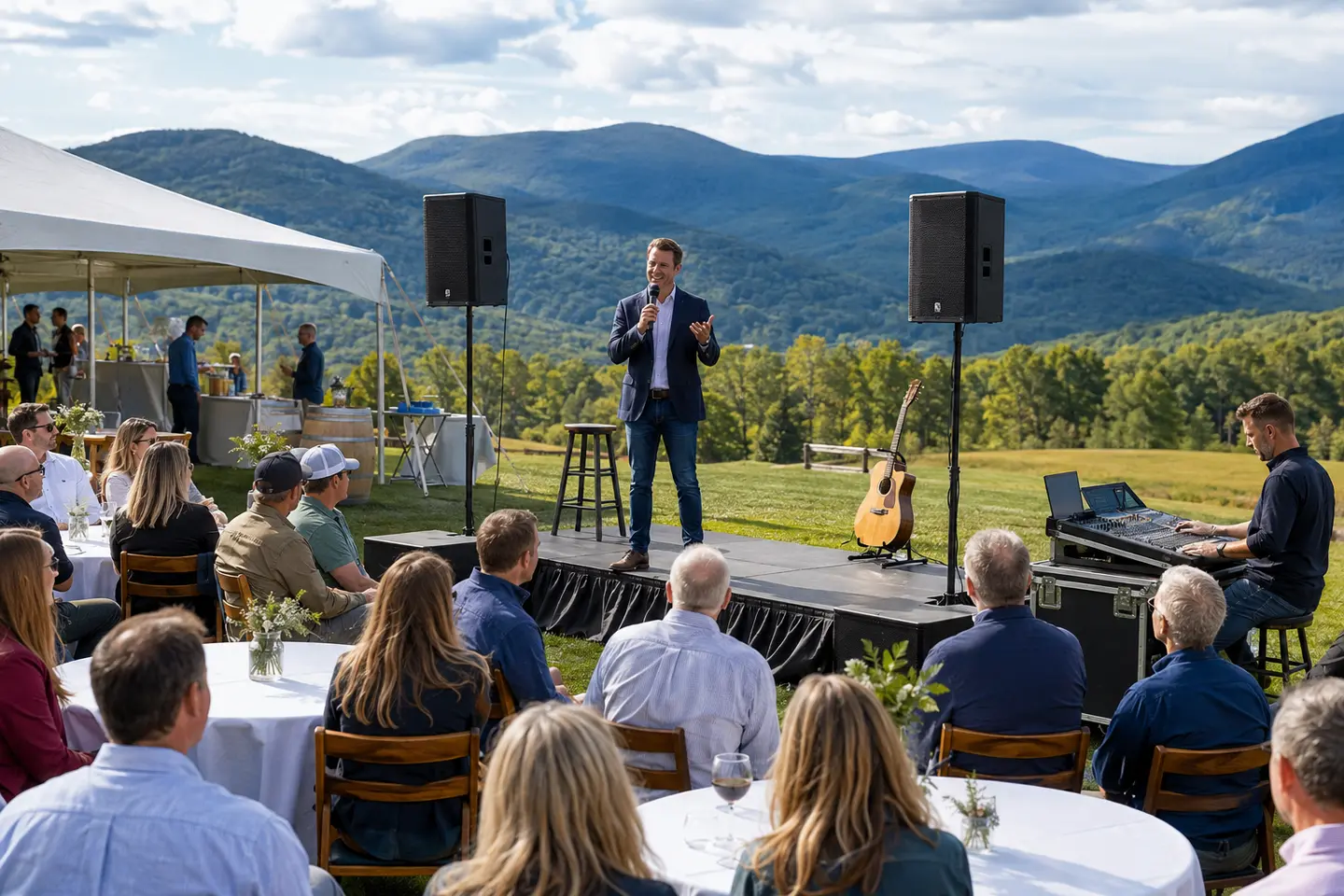
Outdoor company event with a wireless microphone and professional PA in the Blue Ridge Mountains
Podium and lectern speech audio

One speaking position. One complete signal path.

Presenter movement, lectern fit, microphone distance, loudspeaker coverage, handoffs, accessibility, and operator roles shape a clear speech-audio plan.

Plan your event →
Planning FAQ

Answers before event day.

Can I rent a podium microphone in Charlottesville?

Blue Ridge Sound can review temporary podium or lectern microphone requests for Charlottesville-area speeches, lectures, awards, meetings, ceremonies, and community events. Microphone type, PA integration, delivery, setup, staffing, timing, price, and availability are confirmed only in the written proposal.

Is a podium microphone the same as a lectern microphone?

People often use the terms interchangeably. The microphone may mount to or sit on a lectern, podium, table, or separate stand. The important details are the speaking position, attachment method, capsule placement, presenter movement, room coverage, mixer compatibility, and venue approval.

What type of microphone works best at a podium?

A flexible gooseneck microphone is common for a fixed speaking position, but a stand-mounted, handheld, lavalier, or headset microphone may fit better when presenters move, heights vary widely, the venue restricts mounting, or feedback geometry is difficult. The room, program, lectern, PA, presenter technique, and available inputs determine the choice.

Does a podium microphone rental include speakers and a mixer?

Only when the written proposal includes them. A microphone needs a compatible signal path, which may use a confirmed venue system or a temporary PA with mixer, loudspeakers, cabling, stands, power, setup, and testing. Blue Ridge Sound does not assume an installed system is compatible or available for outside use.

Can several presenters share one lectern microphone?

Yes when the program, height differences, speaking positions, adjustment process, handoffs, and operator plan support it. A sound check should establish how the microphone will be repositioned and who is responsible between speakers. Rapid transitions or presenters who move away may justify another microphone path.

How do you reduce feedback from a podium microphone?

Useful working distance, microphone and loudspeaker direction, fewer unnecessary open microphones, appropriate gain, realistic sound checks, room coverage, high-pass filtering and equalization all matter. Digital processing cannot fully compensate for poor geometry, excessive distance, incompatible equipment, or speakers turning away.

How much does podium microphone rental cost in Charlottesville?

Pricing depends on the microphone path, PA and mixer needs, venue system integration, room and audience areas, presenter count, stage layout, cable routing, delivery, setup, rehearsal, technician coverage, event duration, backups, strike, and travel. Blue Ridge Sound provides pricing after the complete event brief is reviewed.

Get the right system on the first trip.

Send the venue and event details. Blue Ridge Sound will recommend a practical rental or staffed production scope.

Start your quote →